

Reviewed by
Jarrett Dottin
Licensed Occupational Therapist dedicated to helping others live their best lives. Certified lymphedema therapist and amazon affiliate who has tested over 1,000 different products. About JD →
As an Amazon Associate I earn from qualifying purchases. Some links on this site are affiliate links, if you buy though them I may make a commission at no extra cost to you.
Quick Verdict
I opened the box and had the setup combinations printed right there in front of me. That’s the whole story with this hybrid USB hub: MAONO put the “how do I wire this” question to bed before I even plugged in. It’s an intuitive device, and that’s what sets it apart.
Buy if you:
- Want to record to a computer and a phone or iPad at the same time
- Are new to audio interfaces and hate wiring guesswork
- Run dual XLR mics for a podcast or two-person stream
- Want condenser and dynamic mic support in one box
Skip if you:
- Want a fully wireless rig, this leans on USB cables to both devices
- Already own a multi-channel interface and don’t need mobile recording
- Only ever record one mic into one computer
| Inputs | Dual XLR (condenser & dynamic) |
|---|---|
| Connectivity | Dual USB-C, MFi-certified |
| Gain | 56dB per channel |
| Recording quality | 24-bit / 192kHz |
| Noise floor | -130dB EIN |
| Software | ProStudio 2 (routing, noise reduction, VST) |
The Setup Combinations Print Was the First Win
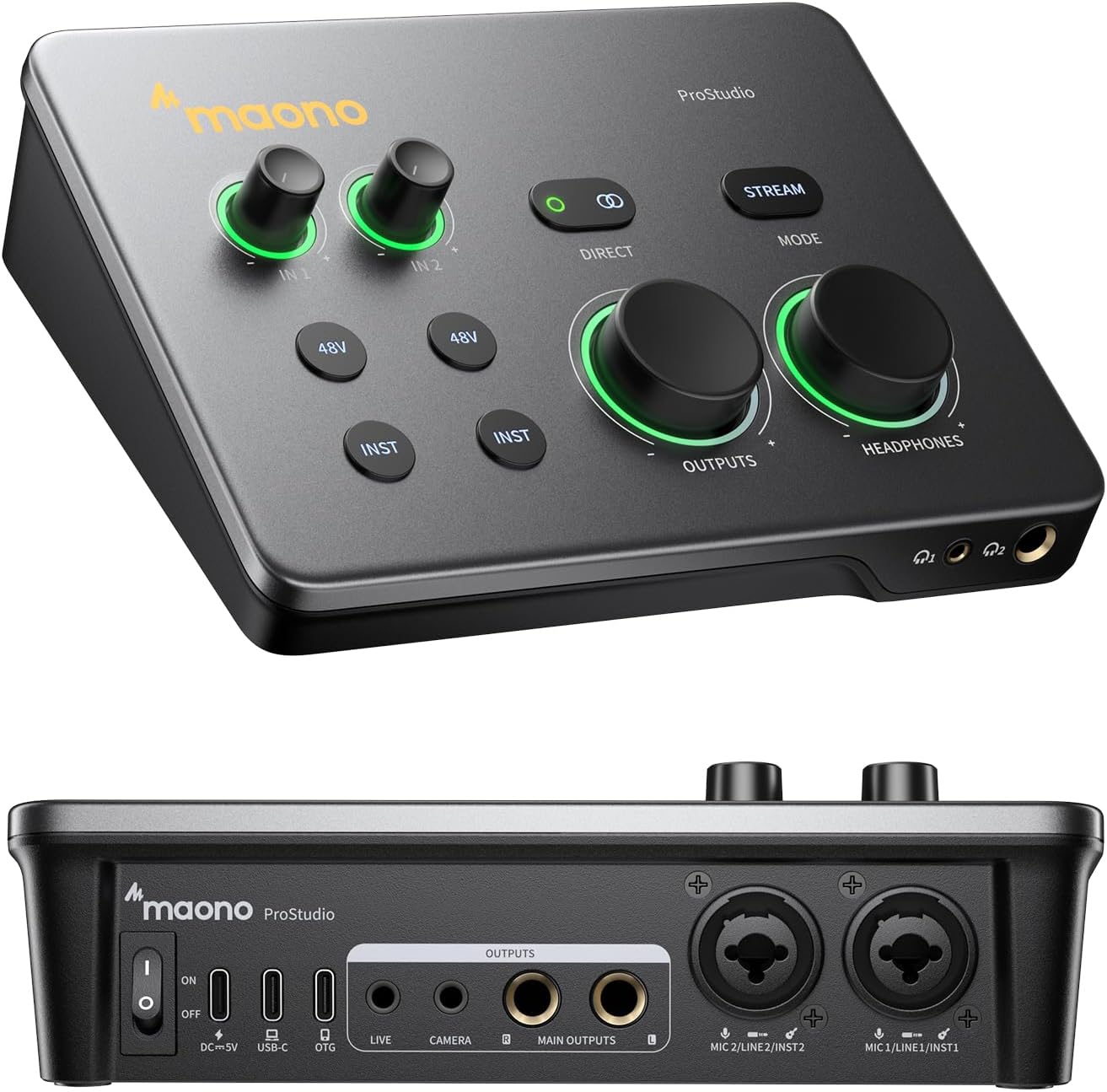
Before I touched a cable, the MAONO P2 hybrid USB hub had already answered my biggest question: every wiring combination is printed directly on the device. Computer-only? Phone and computer? Two mics, one device? It’s all there, in plain text, on the hardware itself. No manual, no guessing which USB-C port feeds which device. That one design call does more for a first-time user than any quick-start guide I’ve seen, and it’s the reason this interface keeps coming up when people ask me what to buy for a no-stress first setup.
What This Hybrid USB Hub Is Built To Do
The P2 feeds two XLR mics into a computer and phone or iPad simultaneously, that’s the hybrid part. The headline feature is dual USB-C connectivity, so you can connect a computer and a phone or iPad at the same time. That’s the “hybrid” part, and it’s the reason I’d point content creators here over a single-output interface. You can track into GarageBand or Logic on a Mac, then stream or upload a cover straight from your phone without unplugging anything.
On the audio side it runs 56dB of gain per channel, records at 24-bit/192kHz, and carries a -130dB EIN noise floor for quiet recordings. The dual XLR inputs work with both condenser and dynamic microphones, which matters if you switch between a studio condenser and a broadcast dynamic. The ProStudio 2 software handles routing, real-time noise reduction, and VST effects.
How Many Things You Can Connect Surprised Me
Counting the connection points on the P2 is where it stops feeling entry-level: two XLR inputs, two USB-C outs, a headphone jack for monitoring, and ProStudio 2 handling routing and loopback on top of all that. For a single desktop box, that’s a more complete rig than most creators build across two or three separate pieces of gear. The independent mute controls mean you can silence a channel while you swap a guitar or a mic without dumping noise into the recording, and the Stream Mode sends your voice equally to both channels so a listener gets a balanced mix.
The direct monitoring is the part I’d lean on most. You hear your own voice or instrument in real time with low latency, so there’s no distracting delay in your headphones while you talk or play. Independent headphone and monitor level controls let you dial each one separately instead of riding a single knob for two jobs.
The Cables Are the Real Cost
Here’s the thing: the “hybrid” magic runs on wires. The P2 gets its freedom from dual USB-C connections to your computer and your phone or iPad, which means you’re managing two cables plus your XLR runs on the desk. If you were hoping for a wireless capture box, this isn’t that. It’s a wired interface that happens to feed two devices at once, and that trade-off is worth knowing before you buy. For me it’s not a deal-breaker, because the whole point is stable, no-hiccup recording, and cables give you that. But a cluttered desk is the price of admission.
Get it now
MAONO P2 Hybrid USB Audio Interface
Get the best price on Amazon →As an Amazon Associate I earn from qualifying purchases. Some links on this site are affiliate links, if you buy though them I may make a commission at no extra cost to you.

Who I’d Hand This To
This is for the creator who’s tired of choosing between devices. If you record a podcast on your laptop but also want to shoot a phone clip or upload a cover from your iPad, the dual USB-C setup does both without you unplugging and re-routing. It’s also for the person who’s brand new to this and gets intimidated by audio gear, because the printed setup combinations remove the biggest fear. Podcasters running two mics, streamers who want a balanced voice on both channels, and musicians tracking guitar and vocals all fit here. If you only ever record one mic into one computer, you’re paying for flexibility you won’t touch.
Direct Comparison: Single-Output vs Hybrid
A basic single-output interface plugs into one computer and stops there. That’s fine if your whole workflow lives on one machine. The MAONO P2’s advantage is the second USB-C port feeding a phone or iPad at the same time, so mobile creators don’t have to move cables around mid-session. The trade-off is that a stripped-down single interface can be cheaper and simpler if you’ll never use the mobile side. So the read is this: if multi-device recording is part of your life, the hybrid design pays off; if it isn’t, a plain interface wins on price.
My Advice Before You Plug In
Read the setup combinations on the device before you touch a cable. They’re right there for a reason, and following them the first time saved me the guesswork. Install ProStudio 2 early so your routing, noise reduction, and loopback are ready before you hit record instead of scrambling mid-session. Plan your desk space for two USB-C runs plus your XLR cables so nothing pulls loose. And match your mics to your inputs: condenser or dynamic both work, but set your gain with the real-time signal indicators so you don’t clip.
Pros
- Setup combinations printed right on the device made getting started extremely simple
- Truly intuitive for people new to audio interfaces
- Dual USB-C lets you record to a computer and phone or iPad at once
- Lots of connection options: two XLR mics, two devices, monitoring, and software routing
- Works with both condenser and dynamic microphones
Cons
- Runs on two USB-C cables plus XLR runs, so desk clutter is real
- The mobile flexibility is wasted if you only record on one computer
- Not a wireless capture solution
Frequently Asked Questions
Does the MAONO P2 work with an iPhone and iPad?
Yes. It uses MFi-certified USB-C connectivity to record to iPhone, iPad, Android, Mac, PC, and even cameras. The dual USB ports are the reason you can run a phone and a computer together instead of choosing one.
Do I need the ProStudio 2 software to use it?
You don’t need it for basic recording, but ProStudio 2 is where the routing, real-time noise reduction, VST effects, and loopback live. If you want to send Spotify, a browser, or a backing track to dedicated channels, that software handles it without digging through PC settings.
Can it power a condenser microphone?
Yes. The dual XLR inputs are compatible with most condenser and dynamic microphones, with 56dB of gain per channel. That range covers quiet condensers and lower-output dynamics alike.
Is there noticeable latency when monitoring?
Direct monitoring delivers low-latency audio, so you hear your voice or instrument in real time without distracting delay. ASIO support also helps keep monitoring tight on Windows for music production.
Can two people record at once?
Yes, thanks to the dual XLR inputs. That’s what makes it a fit for a two-mic podcast or a co-host stream, and the independent mute controls let you silence one channel without affecting the other.
Does it record backing tracks and desktop audio together?
Yes. The built-in loopback captures your instrument, voice, backing tracks, and desktop audio in one workflow. That’s handy for cover songs where you want everything in a single take.
Is it hard to set up if I’ve never used an audio interface?
No, and that’s the standout. The setup combinations are printed right on the device, which makes it extremely simple to use right out of the gate even if you’re not familiar with audio equipment. That removed the intimidation factor for me completely.
What’s the recording quality?
It records at 24-bit/192kHz with a -130dB EIN noise floor. In practice that noise floor means a sensitive condenser in a quiet room won’t pick up a hiss floor behind your voice, the gain can sit high without the signal getting dirty underneath it.
Clicking takes you to the seller's website. We may earn a small commission if you purchase, at no extra cost to you.
Get it now
MAONO P2 Hybrid USB Audio Interface
Get the best price on Amazon →As an Amazon Associate I earn from qualifying purchases. Some links on this site are affiliate links, if you buy though them I may make a commission at no extra cost to you.
🛍️ Shop everything in this video
Every product mentioned, in one place — these are affiliate links, so I may earn a small commission at no extra cost to you.
🛍️ MAONOP2 Audio Interface — check price on Amazon →
About the reviewer
Jarrett Dottin
Licensed Occupational Therapist dedicated to helping others live their best lives. Certified lymphedema therapist and amazon affiliate who has tested over 1,000 different products.