

Reviewed by
Jarrett Dottin
Licensed Occupational Therapist dedicated to helping others live their best lives. Certified lymphedema therapist and amazon affiliate who has tested over 1,000 different products. About JD →
As an Amazon Associate I earn from qualifying purchases. Some links on this site are affiliate links, if you buy though them I may make a commission at no extra cost to you.
Quick Verdict
A gaming mouse with a fan inside it sounds gimmicky until your palm stops sweating mid-match. The Shark Funcooler pairs that TEC cooling system with a 30K DPI sensor and 8KHz polling, so the performance keeps up with the party trick.
Clicking takes you to the seller's website. We may earn a small commission if you purchase, at no extra cost to you.
Gaming Mouse With Built-in Shark Funcooler Fan
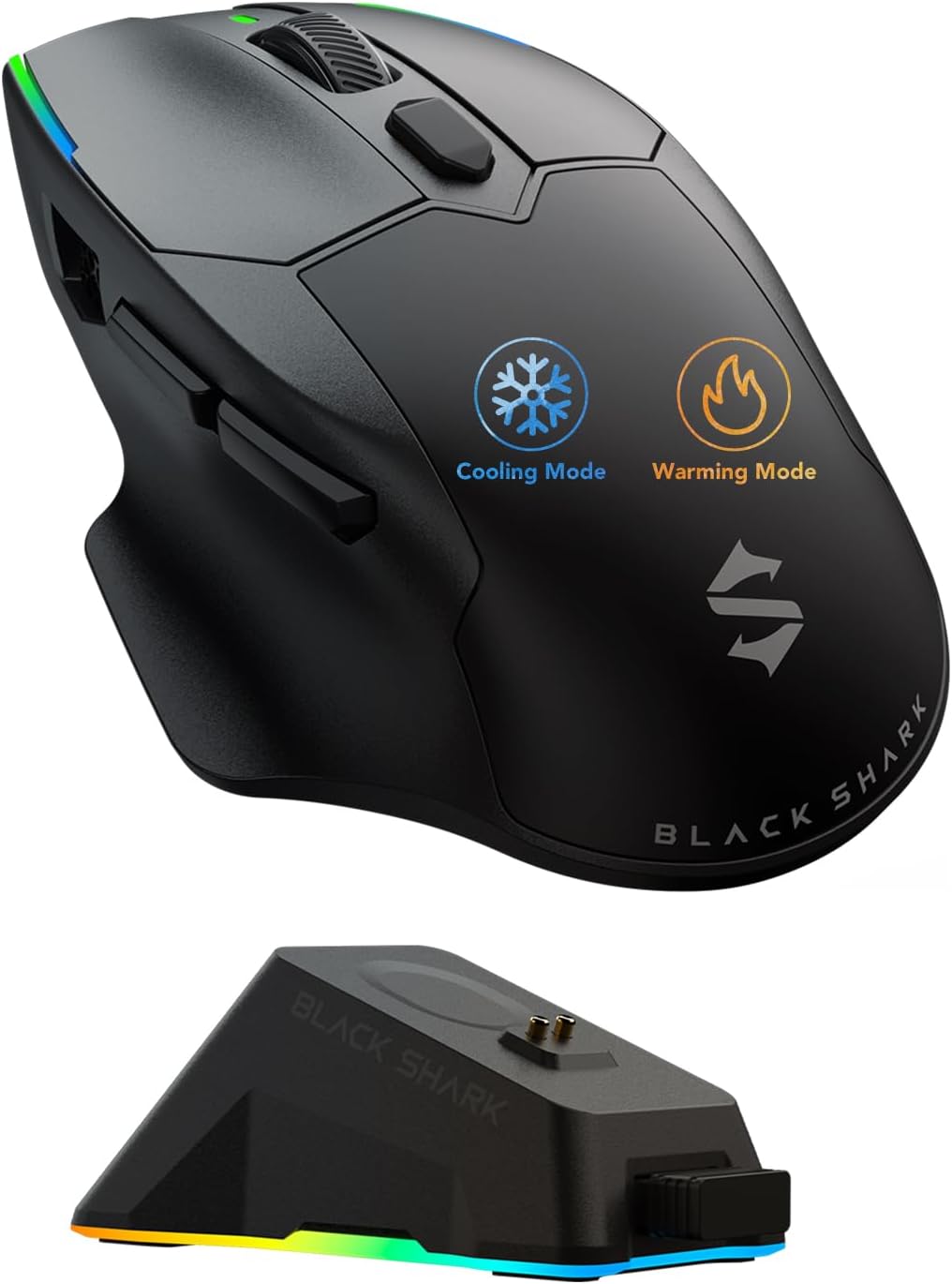
Most gaming mice chase DPI and polling numbers. The Shark Funcooler built a tiny thermoelectric cooling system and a 4700RPM fan into the shell instead, which is either the smartest or the most over-engineered thing I’ve seen on a desk this year. If you’ve ever peeled your palm off a mouse mid-ranked match, you already know exactly what problem it’s solving.
The pitch runs two directions. In summer, the built-in TEC cooling system and a 4700RPM silent fan pull your hand up to 10.3°C cooler. In winter, a heating mode warms your grip up to 20°C so your fingers aren’t stiff on the first click. It’s the first mouse I’ve looked at that treats hand temperature like an actual gaming variable.
What’s Packed Into The Shell
Underneath the cooling gimmick sits a legitimately flagship sensor. The Shark Funcooler runs the PAW3950 optical sensor with a ceiling of 30,000 DPI, and you can flick between four on-the-fly presets: 800, 1200, 3200, and 6400, with 6400 as the default. That covers pretty much every grip and game type without opening any software.
| Spec | Detail |
|---|---|
| Sensor | PAW3950 optical, up to 30,000 DPI |
| Polling Rate | Dual 8KHz (0.125ms latency) |
| Cooling | TEC system + 4700RPM silent fan, up to 10.3°C cooler |
| Heating | Warms hands up to 20°C |
| Connectivity | 2.4GHz, Bluetooth, USB-C wired |
| Battery | Up to 100 hours |
| In the box | Mouse, RGB dock, 2.4G connector, 1.5m USB-C cable, manual |
8KHz Polling Is The Part That Earns The Price
The dual 8KHz polling rate is where competitive players will feel the difference. At 8,000 reports per second, latency drops to a claimed 0.125ms, which means the cursor position updates eight times more often than a standard 1KHz mouse. For FPS and MOBA play, that shows up as smoother tracking and a cursor that stops exactly where you stop moving. It’s the same headline spec you see on mice costing far more, so pairing it with the cooling system is a different combination you won’t find elsewhere.
Tri-mode connectivity rounds it out. You get 2.4GHz for low-latency wireless gaming, Bluetooth for switching between devices or squeezing out battery, and USB-C wired for zero-lag sessions or when the 100-hour battery finally taps out. The RGB charging dock doubles as a home base so the mouse is topped up between marathons instead of dying at the worst possible moment.
The Fan Is A Trade-Off, Not Free Real Estate
Here’s the catch nobody advertises: a fan and a thermoelectric cooler both draw power and take up space. That 4700RPM fan is labeled silent, but any moving part inside a mouse is one more thing that can wear out or collect dust over time. And running active cooling or heating is going to eat into that 100-hour battery figure faster than gaming alone would. If you leave the cooling on all day, plan on charging more often than the headline number suggests. It’s not a deal-breaker, but it’s worth going in with realistic expectations rather than assuming 100 hours with the fan blasting.
Get it now
Shark Funcooler Wireless Gaming Mouse
Get the best price on Amazon →As an Amazon Associate I earn from qualifying purchases. Some links on this site are affiliate links, if you buy though them I may make a commission at no extra cost to you.

Who Should Actually Care About Hand Cooling
If you game in a warm room, or you’re one of those people whose palms sweat the second a match gets tense, the Shark Funcooler is aimed squarely at you. Long ranked sessions where your hand slowly turns into a swamp are the exact scenario this thing was designed around. The heating mode is the flip side: if your gaming space runs cold and your fingers go stiff, warming your grip up to 20°C before you even start is a real comfort upgrade, not marketing fluff.
It’s a right-handed ergonomic shape, so lefties and true ambidextrous-grip players will want to look elsewhere. But for a right-hand FPS or MOBA player who runs hot, the combination of a 30K DPI sensor, 8KHz polling, and active cooling is a package you can’t really find anywhere else right now.
My Advice Before You Buy
Treat the cooling as the reason you’re buying, not a bonus. If sweaty palms aren’t your problem, a straight-up 8KHz mouse without the fan will cost less and last longer on a charge. But if hand temperature genuinely wrecks your aim, this is one of the few mice built to fix it. Start on the default 6400 DPI, dial it in through the four presets before you touch the app, and keep it docked on the RGB base so the battery never surprises you. If sweaty palms tank your aim, buy it. If they don’t, save your money and get a straight 8KHz mouse for less.
Pros
- Active cooling pulls hands up to 10.3°C cooler with a 4700RPM silent fan
- Heating mode warms your grip up to 20°C for cold rooms
- Flagship PAW3950 sensor with up to 30,000 DPI and four on-the-fly presets
- True dual 8KHz polling at 0.125ms latency
- Tri-mode connectivity plus an RGB charging dock
Cons
- Running the fan or heater eats into the 100-hour battery figure
- A moving fan is one more part that can collect dust or wear over time
- Right-handed ergonomic shape only, so lefties are out
Frequently Asked Questions
Does the Shark Funcooler need an app to work?
No, it works out of the box with four DPI presets you switch on the fly. You only need the Black Shark app if you want to fine-tune sensitivity up to the full 30,000 DPI or customize settings beyond the defaults.
Is it compatible with Mac as well as PC?
Yes, the listing covers both PC and Mac. Tri-mode connectivity means you can run it over 2.4GHz, Bluetooth, or USB-C wired depending on the device.
How loud is the cooling fan during a match?
Black Shark rates it silent at 4700RPM, and a fan this small won’t drown out your headset, but you’ll likely hear a faint hum in a quiet room. It’s the trade-off for cooling that actually works, not a fault you can tune away in software.
Will active cooling drain the battery faster?
Yes. The up-to-100-hour rating reflects gaming use, and running the TEC cooler or heater draws extra power on top of that. Keep it on the RGB charging dock between sessions and you won’t notice the hit.
Can I use it wired if the battery dies mid-game?
Yes. The included 1.5m braided USB-C cable lets you plug in for zero-lag wired play, so a dead battery just means switching modes, not stopping.
Is this a good mouse for left-handed players?
No, it’s a right-handed ergonomic shape. Lefties or players who want a symmetrical ambidextrous mouse should look at a different model.
What comes in the box?
The mouse, the RGB charging dock, a 2.4G connector, a 1.5m braided USB-C cable, and a user manual. Everything you need to run it wireless or wired is included.
Is 8KHz polling worth it if I’m not a competitive player?
For casual play the difference over a standard 1KHz mouse is subtle. The 8KHz polling shines in FPS and MOBA titles where the 0.125ms latency translates to sharper tracking, so competitive players get the most out of it.
Get it now
Shark Funcooler Wireless Gaming Mouse
Get the best price on Amazon →As an Amazon Associate I earn from qualifying purchases. Some links on this site are affiliate links, if you buy though them I may make a commission at no extra cost to you.
About the reviewer
Jarrett Dottin
Licensed Occupational Therapist dedicated to helping others live their best lives. Certified lymphedema therapist and amazon affiliate who has tested over 1,000 different products.